Infostealers (like Lumma or RedLine) are the primary tools in the Malware-as-a-Service (MaaS) economy. Unlike ransomware, they don’t lock your files. They quietly copy your browser cookies, passwords, and crypto-wallets and vanish. Keep reading this Infostealer Prevention Guide to learn more.
The Invisible Red Flags
Since most modern stealers (2025–2026 variants) bypass standard Windows Defender signatures, watch for these system behaviors:
- The Glitchy Window: A command prompt (black box) or a window flashes on your screen for a split second and disappears. This is often the malware executing its initial script.
- Unexplained Heat or Lag: Your laptop fan starts spinning loudly while you are just browsing, or the Activity Monitor/Task Manager shows an unknown process using high CPU.
- Security Notification Ghosting: You receive a “New Login” alert from Google or Instagram from a strange city, but when you check your “Recent Devices,” the session is already gone (attackers often log in, grab what they need, and log out immediately).
- MFA Fatigue: Receiving multiple “Approve Login” notifications on your phone that you didn’t trigger.
Critical Security Hardening
Standard passwords are no longer enough. Follow these steps to neutralize a stealer even if it infects your machine:
- Purge Browser “Autofill”: Browsers store passwords in a way that is incredibly easy for stealers to export. Move all sensitive logins to a dedicated Password Manager (1Password, Bitwarden, etc.).
- Session Cookie Management: Modern stealers bypass MFA by stealing your “logged-in” cookies. Manually log out of banking or crypto sites when finished rather than just closing the tab.
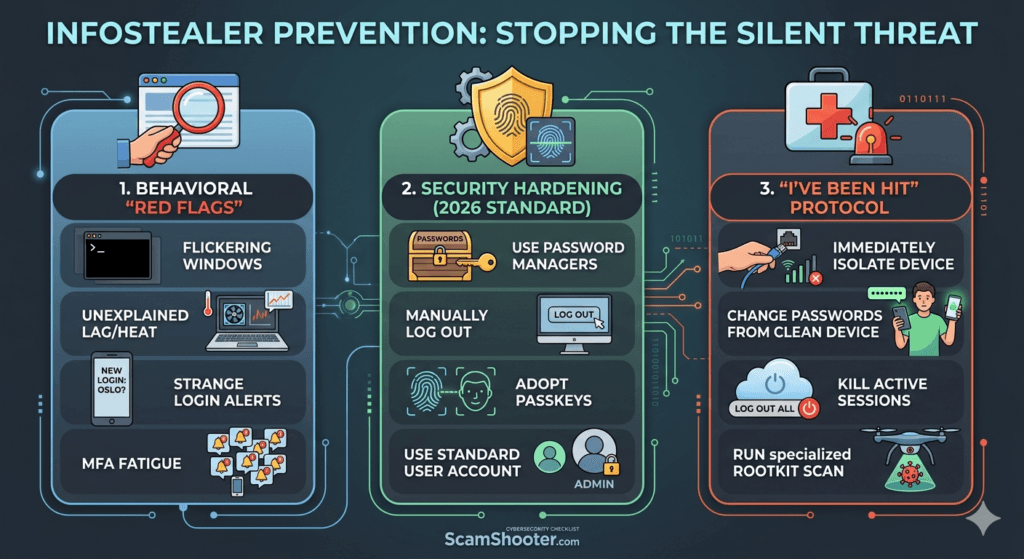
- Passkey Adoption: Switch to Passkeys (biometric login) where possible. Since there is no password for the malware to scrape, the stealer has nothing to steal.
- Isolated Admin User: Do not browse the web on an account with Administrator Privileges. Create a Standard User for daily work so malware cannot easily install itself.
The “I Have Been Hit” Protocol
If you suspect an infection, the order of operations is vital. Do not change passwords on the infected device.
- Isolate: Disconnect the device from the Wi-Fi/Ethernet immediately to stop data exfiltration.
- Clean Device First: Use a trusted, separate device (like a clean smartphone) to begin changing your primary email and banking passwords.
- Kill Active Sessions: Go to your Google/Microsoft security settings and select “Sign out of all other sessions“. This invalidates the stolen cookies.
- Deep Scan: Run a specialized “Rootkit” or “Anti-Malware” scan (like Malwarebytes or Sophos) in Safe Mode. If it’s a work device, a full system wipe (factory reset) is often the only way to be 100% sure.